¶ What are Digital Vouchers
Customers and staff can store digital vouchers on their smartphones (Apple Wallet / Google Wallet) or Apple Watch, and use them at checkout to apply discounts or redeem free products.
Vouchers can be redeemed in two ways:
- NFC tap — the customer holds their phone or watch near the NFC reader
- QR code scan — if the tap fails, the customer opens the pass details to display a QR code, which you scan at the till
Each voucher is date-specific and single-use. Vouchers cannot be exchanged for cash. Always wait for confirmation on the till screen before completing the transaction or letting the customer leave.
¶ Redeeming Any Voucher at the Till
The steps below apply to all voucher types. See the sections further down for voucher-specific cart requirements.
1: Ask the customer to open the correct pass in Apple Wallet or Google Wallet — they should check the date and meal type before presenting it2: Add the necessary items into the shopping cart3: Tap on the gray bar located within the cart to start voucher redemption4: Instruct the customer to hold their phone or Apple Watch above the NFC reader- iPhone / Apple Watch: top of the device
- Android: back of the phone
5: Wait for the till to confirm the discount has been applied before completing the sale
IF NFC TAP FAILS
Ask the customer to open the pass details or information section in Apple Wallet or Google Wallet. This displays a QR code on the pass.
With the gray bar still active in the cart, scan the QR code at the till instead of using the NFC reader. The system will apply the discount once the code is read successfully.
¶ Breakfast Vouchers
Covers 1 × breakfast item.
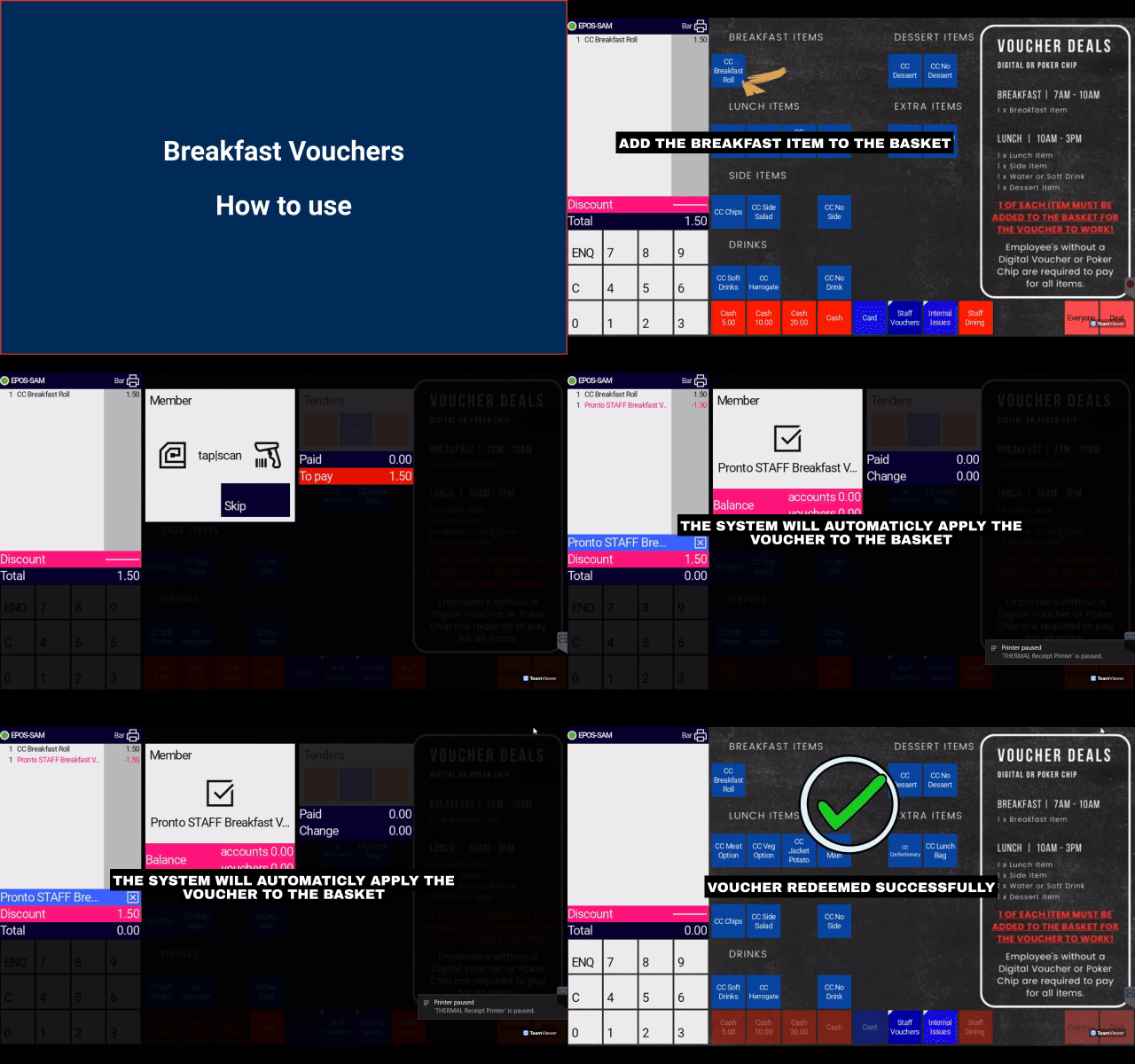
1: Add the necessary items into the shopping cart2: Tap on the gray bar located within the cart3: Instruct the customer to hover their phone above the NFC reader4: The system will automatically apply the discount to the cart
STAFF VOUCHERS
Staff may say they are using a staff meal voucher. The till process is the same — confirm the pass shows the correct date and that it is a breakfast voucher before redeeming.
¶ Lunch Meal Deal Voucher
.gif)
REQUIREMENTS
To successfully activate the voucher, you need to add one item from each section of the meal deal.
If a customer does not want an item, select the "No" option in that section.
1: Add the necessary items into the shopping cart2: Tap on the gray bar located within the cart3: Instruct the customer to hover their phone above the NFC reader4: The system will automatically apply the discount to the cart
¶ Staff Lunch Voucher (Single Item)
Some staff lunch vouchers cover 1 × lunch item only (not a full meal deal). These are typically used at dedicated staff feeding locations such as Food & Fraternity.
REQUIREMENTS
Add one eligible lunch item to the cart. This voucher type does not require selections from every meal-deal section — only a single lunch item.
Confirm the pass shows the correct date before redeeming. Staff receive a separate voucher for each day they are eligible.
1: Add the lunch item into the shopping cart2: Tap on the gray bar located within the cart3: Instruct the customer to hover their phone above the NFC reader (or scan the QR code if tap fails)4: The system will automatically apply the discount to the cart
¶ Evening Meal Vouchers
Covers 1 × evening hot meal. Used at staff welfare feeding locations.
REQUIREMENTS
Add one eligible evening hot meal to the cart. Confirm the pass shows the correct date and evening meal type before redeeming.
Not all welfare locations accept both breakfast and evening vouchers — check your site configuration if unsure.
1: Add the necessary items into the shopping cart2: Tap on the gray bar located within the cart3: Instruct the customer to hover their phone above the NFC reader4: The system will automatically apply the discount to the cart
¶ Lavazza Free Coffee Voucher
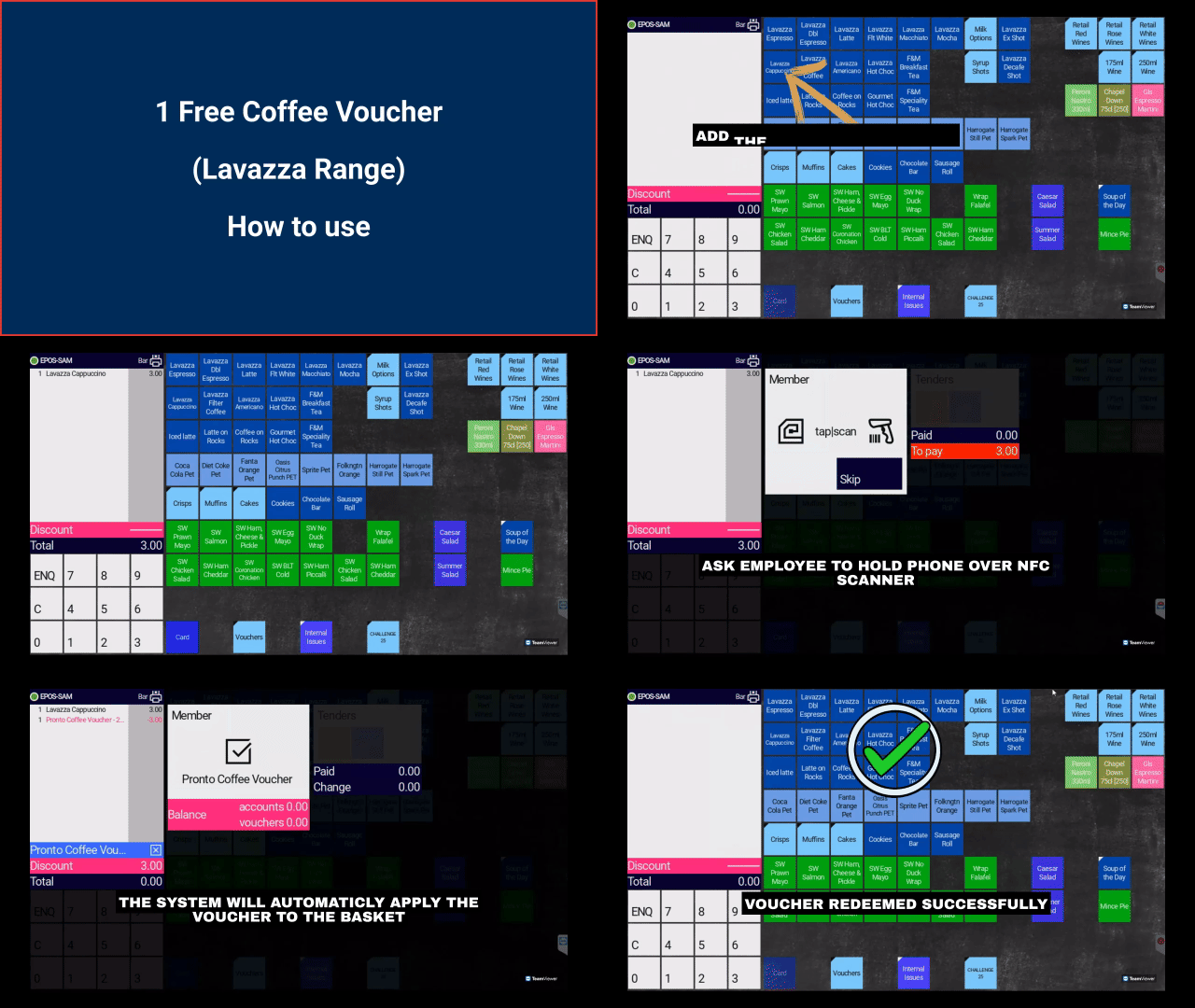
1: Add the necessary items into the shopping cart2: Tap on the gray bar located within the cart3: Instruct the customer to hover their phone above the NFC reader4: The system will automatically apply the discount to the cart
¶ Free Drink Voucher
.gif)
1: Add the necessary items into the shopping cart2: Tap on the gray bar located within the cart3: Instruct the customer to hover their phone above the NFC reader4: The system will automatically apply the discount to the cart
¶ Troubleshooting
| Issue | What to do |
|---|---|
| NFC tap not working | Ask the customer to open pass details and show the QR code. Scan it at the till with the gray bar active. |
| Wrong voucher / wrong date | Ask the customer to scroll through their wallet passes and select the pass matching today's date and meal type. |
| Discount not applied | Check the cart meets the voucher requirements (see sections above). Do not complete the sale until the till confirms the discount. |
| Customer has no smartphone | Direct staff voucher holders to the staffing team in the 1711byAscot Marquee for assistance. |
| Voucher already used | Each pass is single-use. The customer may be trying to reuse a pass from a previous day or meal — ask them to check for another pass. |
HELP VIDEOS (for customers)
If a customer needs help adding their voucher to their phone, share these links: